When your team works in one building, handing out uniforms is easy. However, it gets harder when you have staff in a dozen locations or remote employees across the country. An employee uniform program solves this because it gives everyone one simple way to get the right apparel. Below, we cover the catalog, sizes, uniform budgets, and how a uniform ordering portal ties it all together.
What is an employee uniform program?
An employee uniform program is a set of rules and tools that controls which branded apparel employees get, how they order it, and who pays. Specifically, it covers the approved items, sizes, budgets, and approvals. As a result, every team member looks consistent, whether they work at headquarters or from home.
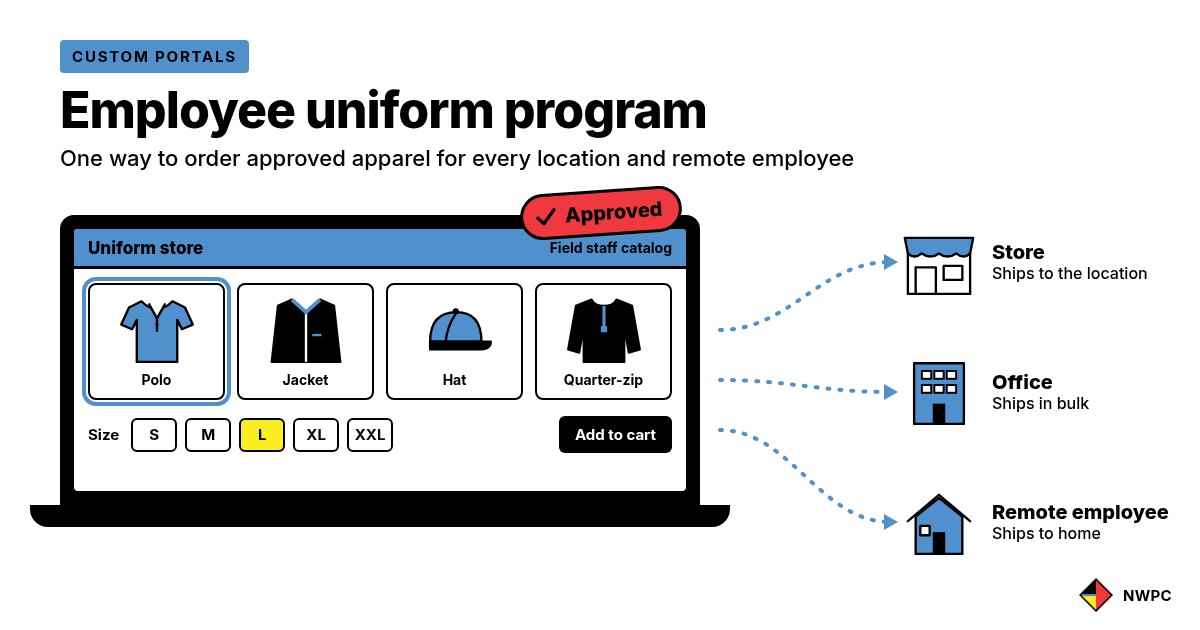
A good program usually includes three parts:
- An approved catalog. The shirts, polos, jackets, hats, and outerwear your company allows.
- Ordering rules. Who can order what, how often, and with whose approval.
- Fulfillment. How you store, pack, and ship the apparel to each person or location.
Why do uniform programs break down for remote employees and multiple locations?
At first, most programs start small. Then the company grows, and the old process stops working. Here are the most common problems:
- Ordering happens over email. Requests pile up in one person’s inbox, so orders slip through the cracks.
- Each location buys its own gear. As a result, colors, logos, and quality vary from site to site.
- Sizes are a guessing game. Remote employees cannot try anything on, so returns and swaps add up.
- Nobody tracks spending. Without uniform budgets, some teams over-order while others go without.
- Extra stock sits in closets. Leftover sizes take up space, but nobody wears them.
When employees are spread across multiple cities or states, these small problems multiply. However, a clear employee uniform program fixes the process, not just the product.
How our custom portals can help:
Our custom portals are setup to match how your business operates…
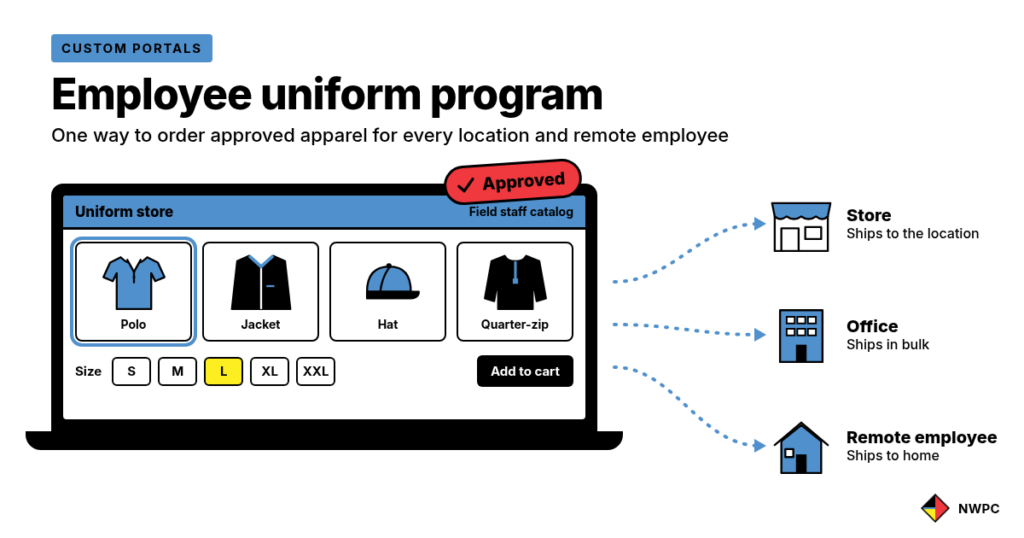
- Group employees by role. For example, field staff, office staff, and managers may need different items. Your custom portal can utilize different user groups to only show a user what they need to see.
- Build an approved catalog. Choose the garments, colors, and decoration for each role. Embroidery works well for polos and jackets, while heat transfers suit larger shirt runs.
- Plan sizes and styles. List the size range for each item, and share the size chart before people order.
- Set uniform budgets and approval rules. Decide how much each role can order and when a manager needs to approve. You can also load in credits to user groups for birthdays, holidays, or annual stipends.
- Decide where orders ship. For instance, some items go to a location in bulk. Others ship directly to remote employees at home.
- Choose stocked or on-demand items. Keep core items on the shelf, but order seasonal pieces as needed.
- Review reports on a schedule. Then use your uniform ordering portal data to adjust the catalog.
Not sure which decoration method fits each garment? Our guide to embroidery vs. heat transfers vs. screen printing breaks it down in detail.
What should a uniform ordering portal include?
Our custom portals are private, branded websites where approved employees order their uniforms from a set catalog. In effect, it turns your employee uniform program into a simple online store. Here is what to look for:
| Portal feature | What it does | Why it matters |
|---|---|---|
| Approved apparel catalog | Shows only the items your company allows | Keeps every order on brand |
| Size and style options | Lets users pick garment, color, size, and quantity | Cuts down on wrong orders |
| User roles and location access | Shows each person the items for their role or site | Field and office teams see different catalogs |
| Approval workflows | Routes orders to a manager or admin first | Adds a check before anything ships |
| Budget and spend reporting | Tracks orders, usage, and spend by location | Shows where uniform budgets go |
| Storage and fulfillment | Stores inventory and ships to locations or individuals | Remote employees get gear at home |
| Kits and bundles | Groups apparel with other branded items | Makes new hire welcome kits easy |
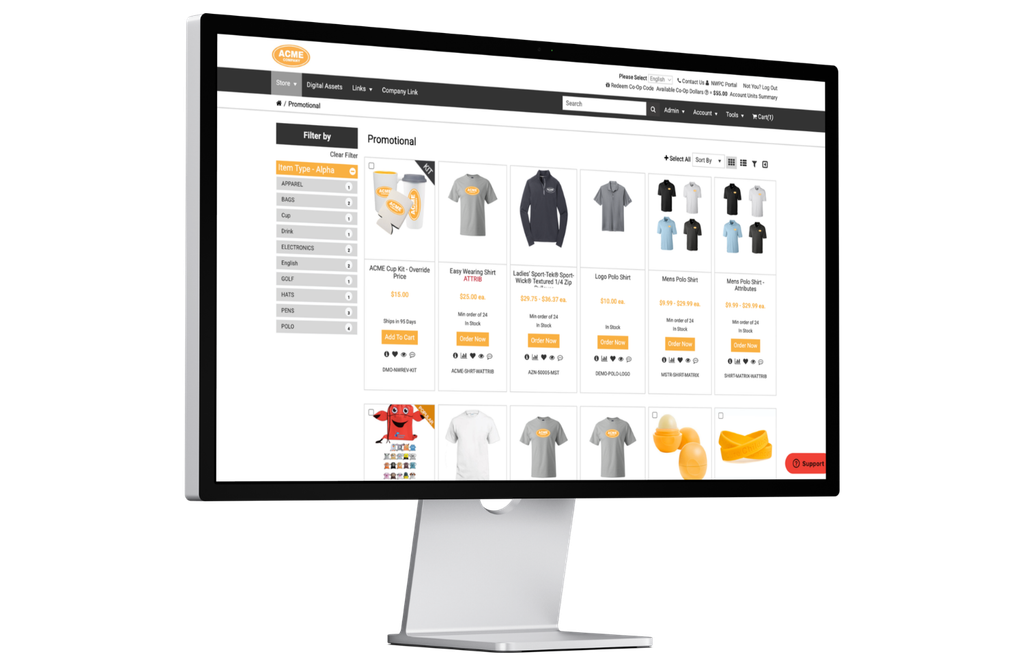
At NWPC, our custom portals support each of these features. In addition, portal orders can connect to our branded apparel team and our warehousing and fulfillment services.
How do you handle sizing for remote employees?
Sizing is the hardest part of any uniform program for distributed teams. After all, remote employees cannot walk into a supply room and try things on. These tips help:
- Share a size chart for every garment. Sizes vary by brand, so one chart does not fit all.
- Ask for sizes during onboarding. That way, the first order is right from day one.
- Keep styles consistent. Once someone knows their size in a style, reorders get easy, since there is no guesswork.
- Set an exchange policy up front. Decide how swaps work before the first order ships.
- Stock your most common sizes. Then order less common sizes as needed, so extra stock does not pile up.
Who pays for uniforms, and how do you set uniform budgets?
In general, this depends on your policy and your industry. Many companies cover required uniforms in full. Others, however, give each role a set budget and let employees pay for extras. Our portal allows for an array of payment options, including Purchase Orders and Credit Card Payments. Credit dollars can also be applied to user accounts for onboarding, work anniversaries, birthdays, and stipends!
Employee uniform program checklist
Before you launch, work through this list:
- Group employees by role and location.
- Approve the garments, colors, and decoration for each role.
- Publish a size chart for every item.
- Set uniform budgets and approval rules.
- Gather shipping addresses for locations and remote employees.
- Decide which items to stock and which to order on demand.
- Write a simple exchange policy.
- Finally, launch your uniform ordering portal and choose who reviews reports.
Employee uniform program FAQs
What should an employee uniform program include?
Generally, it should include an approved catalog, size options, ordering rules, uniform budgets, and a plan for shipping. Many companies also add approvals and regular reporting.
Can remote employees order through a uniform ordering portal?
Yes. A uniform ordering portal is online, so employees can order from anywhere. With NWPC, apparel can ship either to a location or directly to the employee.
Can different roles see different uniforms?
Yes. Portals can support user roles, department catalogs, and location-based access. So a field technician and an office manager can each see the right items.
Can uniform orders require a manager’s approval?
Yes. NWPC can set up approval workflows so managers, regional leaders, or admins review orders first. You can also set approvals by budget, quantity, user role, or item.
Can new hires get uniforms in a welcome kit?
Yes. NWPC can combine apparel with promotional products and printed materials for onboarding kits. Then the kit ships to the new hire or their location.
Is an employee uniform program only for large companies?
No. Portals are especially helpful for multi-location teams. Still, smaller businesses with repeat apparel orders or strict brand standards can benefit, too.
Ready to simplify uniform ordering?
If you manage uniforms through emails and spreadsheets, a uniform ordering portal offers an easier way. Our team can help you plan the catalog and the ordering rules, as well as the fulfillment behind them.
Connect with NWPC to talk about an employee uniform program for your team.